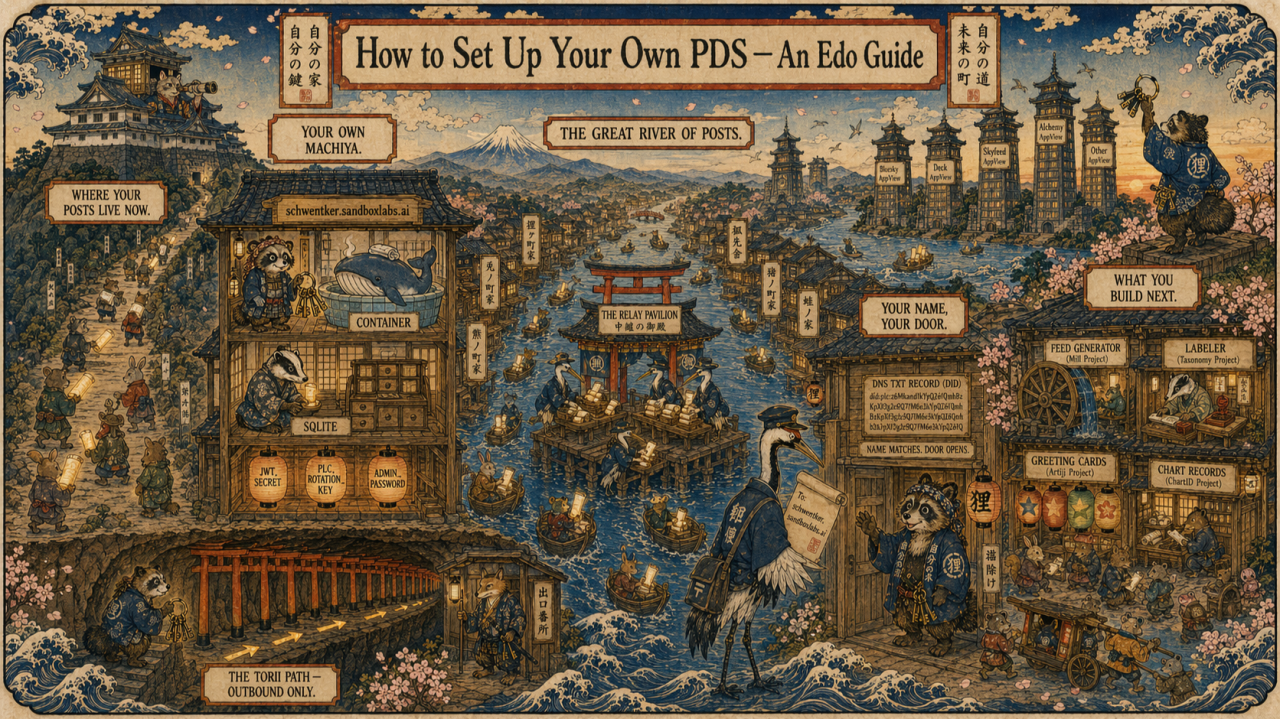
Or: why I built a little Bluesky machiya on the side of a Google mountain, and how you can too
Most of what you post online lives in someone else’s building. You show up, hand your scroll to the doorman, walk away. The doorman files it somewhere you can’t see. You don’t have a key. If the building burns down, or the landlord raises rent, or decides you’re not welcome, your scrolls go with it.
Bluesky is different. Not because of who runs it, but because the architecture is locked open. The protocol underneath it, called ATProto, was built so anyone can run their own building. Your posts, your follows, your identity can live in a machiya you own, on land you rent from whoever you choose.
This article is a walkthrough for building that machiya.
Who it’s for: citizen builders. People learning what’s often called “vibe coding”, which means working with AI tools to build real things without a CS degree. If that’s you, you’ll follow every step. I explain terms inline as they come up, and there’s a glossary at the end.
It’s also for advanced engineers, who should find the commentary mildly amusing. The jokes get nerdier as we go. You’ve been warned.
Why bother?
Three reasons.
Identity sovereignty. Your Bluesky handle and your DID (that’s your Decentralized Identifier, a permanent name your account uses behind the scenes) can live on your own domain, on your own server. If Bluesky the company goes sideways, you take your identity with you. Try that on Twitter.
Proof of work. If you’re building anything in the ATProto ecosystem (a feed, a labeler, an app), running your own PDS is how you signal to other builders that you’re serious. It’s the “I compile from source” of this world.
The learning. A PDS is a small, self-contained system that touches everything: containers, DNS, TLS, a database, a tunnel, an identity layer. Setting one up is a compressed tour of most of modern web infrastructure. You will understand the internet better on the other side.
Scene 1: Where your posts live now
Imagine a mountaintop castle. A bakeneko cat daimyo in rich robes lounges in the throne room. Small animals trudge up the long path carrying glowing scrolls: their posts, their photos, their messages. They hand the scrolls over at the gate and walk back down empty-handed.
That’s every platform you’ve ever used.
The posts go in. You don’t have keys. The daimyo decides what happens next.
The architecture of the old internet made this inevitable. Running a server was hard. Running one that scaled to millions of users was very hard. So most of us handed our scrolls over and hoped for the best. The compromise felt natural because the alternative was impossible.
It’s no longer impossible.
Scene 2: Your own machiya (home)
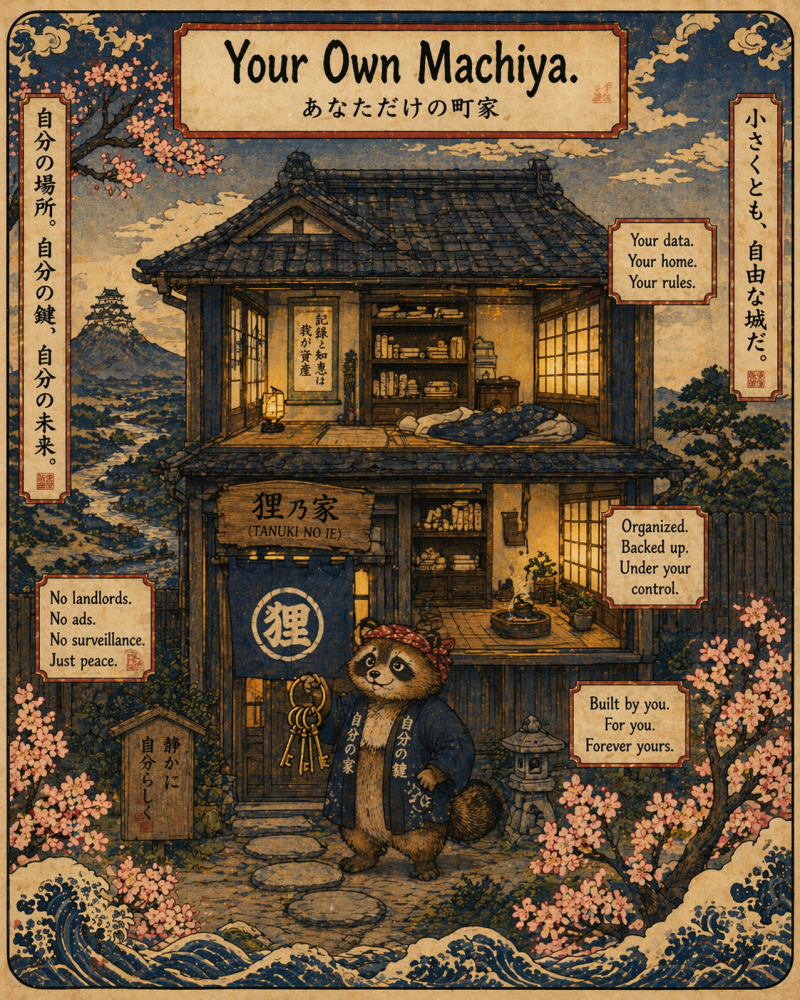
A machiya is a traditional Japanese townhouse. Modest, beautiful, two stories, tiled roof, shoji screens. Not a castle. Doesn’t need to be.
Your PDS is your machiya.
PDS stands for Personal Data Server. It’s a small piece of software that holds your ATProto repository, which is a fancy word for the archive of everything you post, follow, like, and create on Bluesky. The PDS is where those records actually live. It signs them with your keys. It serves them to the network. It belongs to you.
When you sign up for Bluesky through the app, your repository lives on bsky.social, which is Bluesky the company’s shared PDS. That’s fine. It works. Most people will never leave it and nothing bad will happen to them.
But you don’t have to stay there. ATProto was designed so you can migrate your entire repository (every post, every follow, your DID, your identity) to a PDS you run yourself. Nothing breaks. Your followers don’t know the difference. Your handle keeps working. The machiya has the same address. You just own the deed now.
Scene 3: The great river of posts
Here’s the part that trips people up. If everyone runs their own PDS, how does anyone see anyone else’s posts?
The answer is the river.
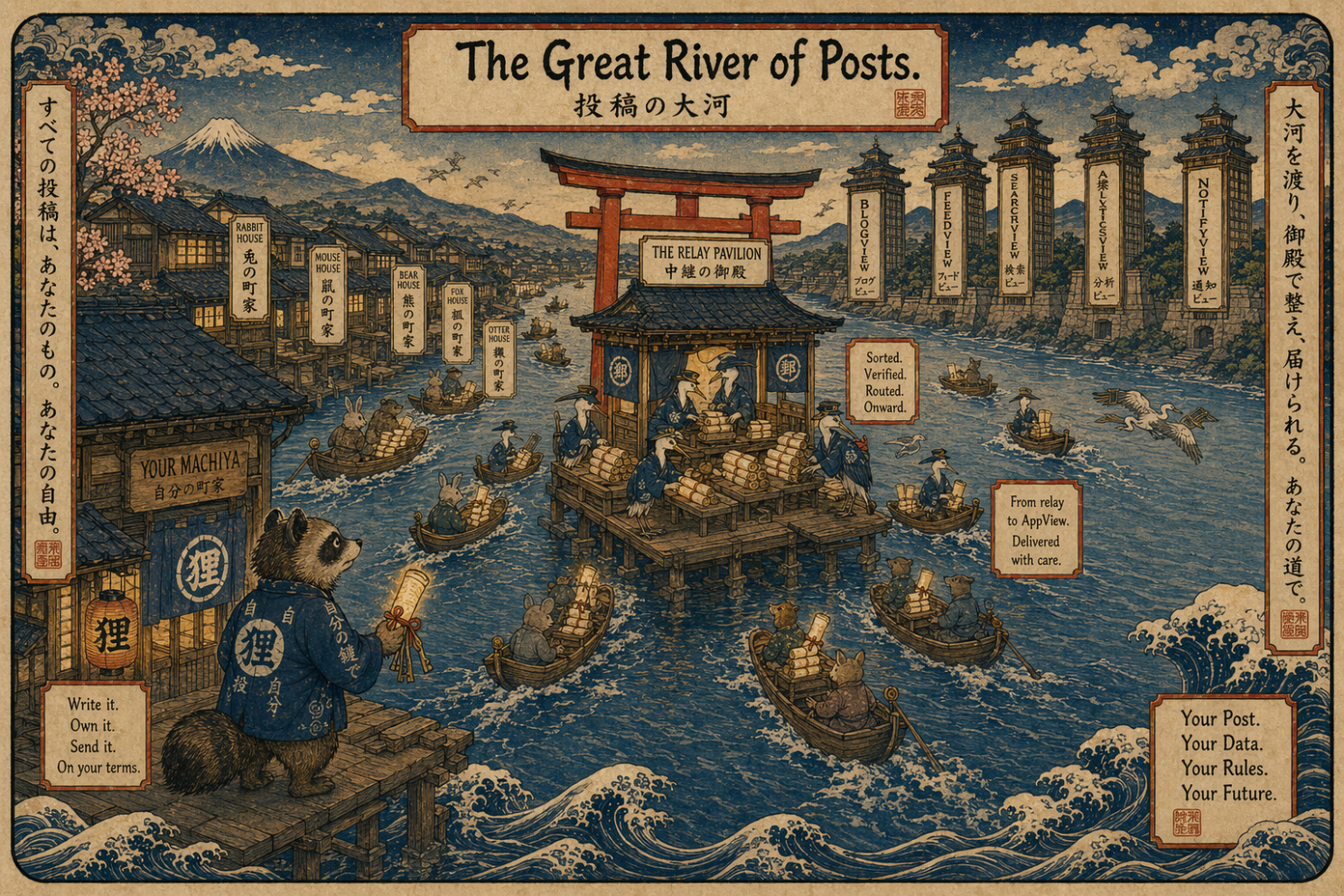
Picture a wide river. Every machiya has a small dock. When you publish a scroll, it goes on a boat downriver to a large pavilion called a relay. The relay’s job is to sit in the middle of the river and receive scrolls from every PDS that wants to publish. It doesn’t store them long. It just broadcasts them, a firehose of every post from every PDS, in order, as they happen.
On the far bank stand tall towers called AppViews. These are the clients. Bluesky the app is one, but there can be many. Each AppView watches the firehose, picks the scrolls it cares about, indexes them, and shows them to its users in whatever way it wants.
Your PDS publishes. The relay broadcasts. The AppViews consume.
This is the key insight of ATProto: the protocol separates storing your data from showing your feed. Different layers, different companies, different open-source projects can each own a piece. If one layer goes bad, you swap it without losing the others. This is what “locked open” means.
For the engineers in the back: yes, it’s CQRS across organizational boundaries. Command side is the PDS, query side is the AppView, the relay is a global event bus. You will find this architecturally delightful or deeply cursed. Either reaction is correct.
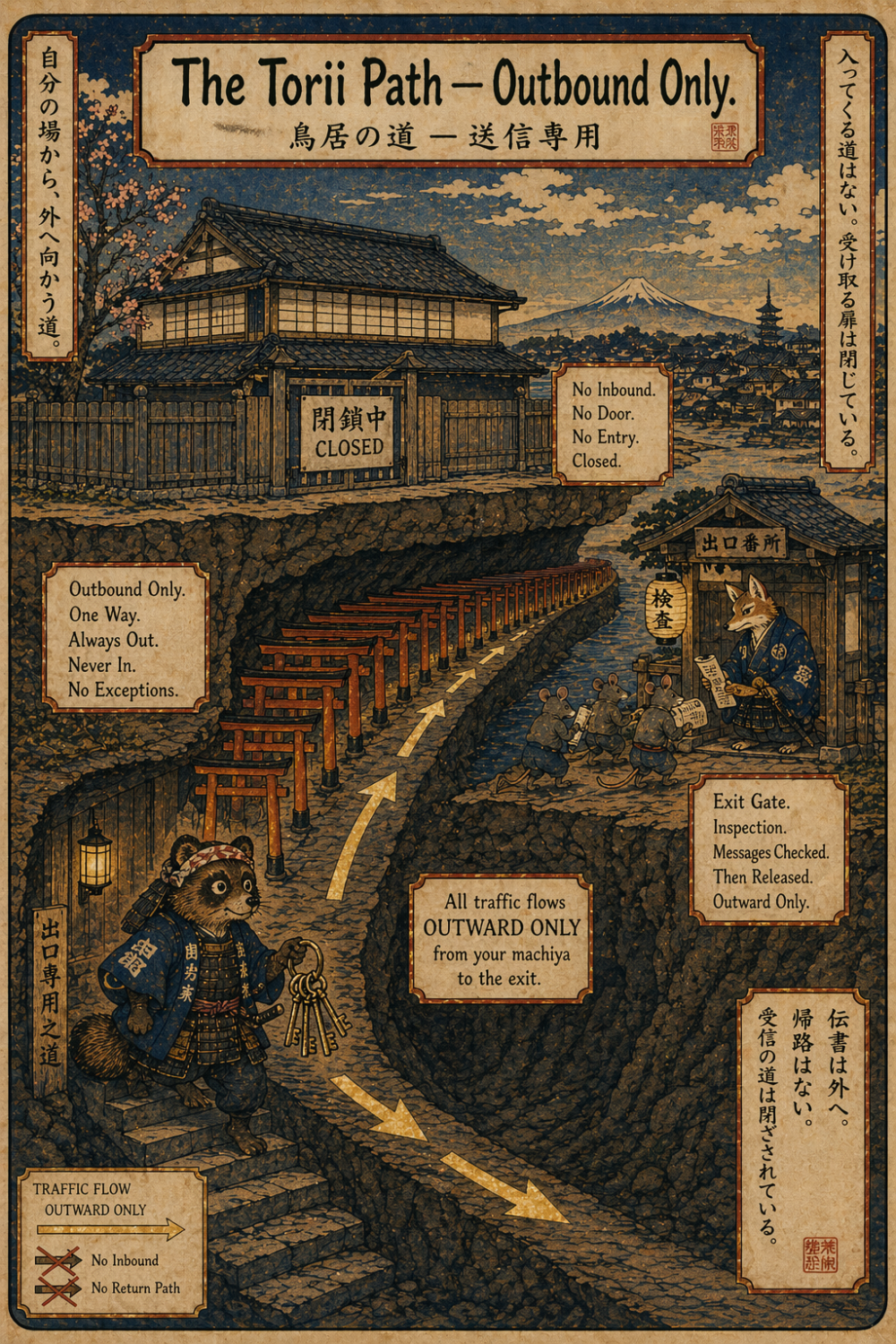
Scene 4: The torii path
So your PDS needs to be reachable on the public internet. The relay has to be able to fetch from it. Other AppViews have to be able to query it.
The old way to do this: get a server with a public IP address, open port 443, manage firewall rules, set up TLS certificates, fight with Let’s Encrypt, pray nothing gets hacked.
The new way, and the way we’re going to use: Cloudflare Tunnel.
A Cloudflare Tunnel is an outbound-only connection from your server to Cloudflare’s network. Your server reaches out to Cloudflare and says “hi, I’m here, any traffic for pds.sandboxlabs.ai should come through me.” Cloudflare accepts incoming requests on your behalf, encrypts them, and pushes them down the tunnel to your PDS.
No open inbound ports. No exposed IP. No TLS certificate management on your end (Cloudflare handles that at its edge).
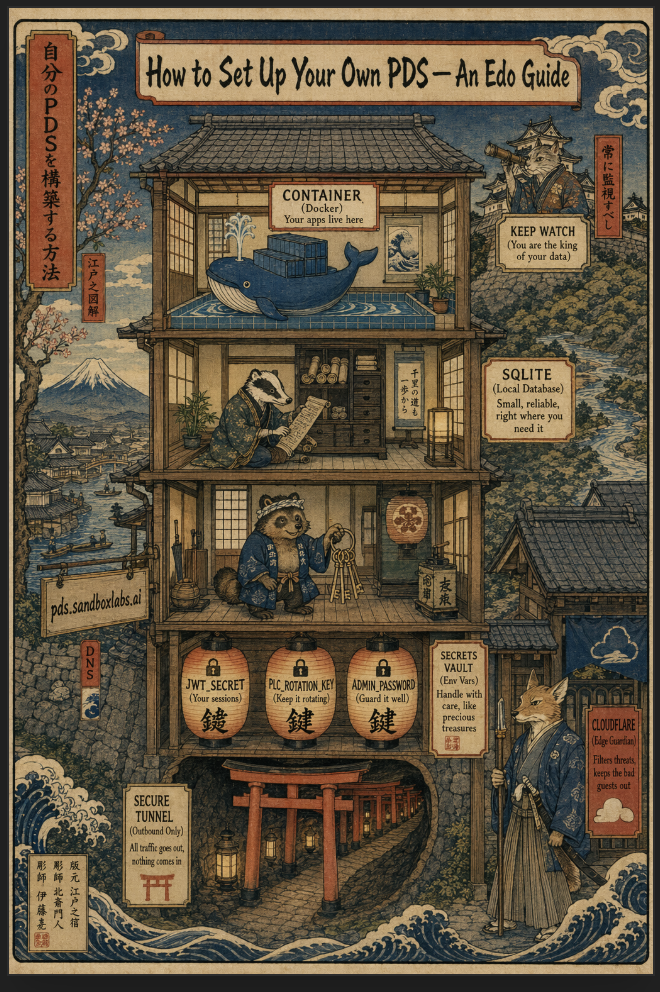
Picture a long underground tunnel lined with vermillion torii gates running from the basement of your machiya out to a distant guardhouse. A samurai kitsune fox (Cloudflare) stands at the guardhouse. All traffic flows one way, outbound from you. Threats can’t walk up to your front door because your front door is sealed. The tunnel is the only path.
The tradeoff worth naming: if Cloudflare has an outage, your front door disappears with it. For a personal PDS that’s an acceptable risk. For a multi-tenant production deployment you’d want a backup path.
For the advanced crowd: yes, this is essentially zero-trust network architecture where your origin is network-invisible. Cloudflare’s cloudflared client handles the long-lived QUIC connection. It’s Tailscale for web services, roughly. And yes, you’re trading one trust relationship (your ISP or hosting provider) for another (Cloudflare). Pick your poison. I picked the one that costs zero dollars.
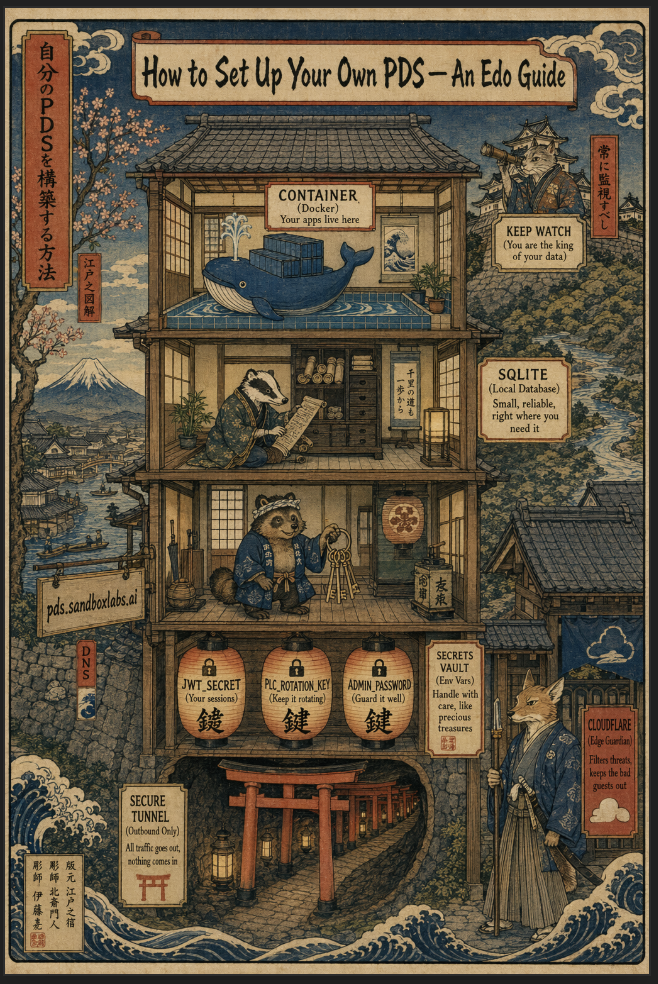
Scene 5: Inside the machiya
Let’s take the roof off and look inside.
Top floor: Docker (the container). Docker is a tool that runs software in an isolated bubble called a container. Think of it as a shipping container for programs. You put the program inside with all its dependencies, seal it up, ship it anywhere. Your PDS runs inside a Docker container. The whale is Docker’s mascot. Yes, the whale is in a bath. The joke writes itself.
Middle floor: SQLite (the local database). SQLite is a small, fast, incredibly reliable database that lives as a single file on disk. No server, no setup, no password. Your PDS uses SQLite to track accounts, sessions, and metadata. The scholarly badger is the right energy for SQLite: quiet, deeply competent, everywhere already, rarely celebrated. SQLite is in your phone, your browser, probably your car. You’ve been using it for years without knowing.
Ground floor: the tanuki with keys. That’s you. Specifically, that’s you SSH’d into your server holding three secrets: a JWT_SECRET (signs session tokens), a PLC_ROTATION_KEY (proves your DID is really yours, more on this below), and an ADMIN_PASSWORD. These live in a file called .env and they are the keys to everything. Do not paste them into a chat. Do not commit them to git. If they leak, rotate them. The lanterns in the illustration glow because these secrets are warm. If they go cold they stop working. If they burn too bright they leak. That’s the joke for the ops people.
The chain and anchor labeled IDENTITY. This is your DID (Decentralized Identifier), usually a did:plc: style identifier when you create an account through the standard flow. It’s a long string that uniquely names your account forever. When someone looks up “schwentker.sandboxlabs.ai” the network follows the chain to verify it’s really mine. The anchor is a good metaphor. Pull on the chain, you find the boat.
The signpost: pds.sandboxlabs.ai, live. That’s the public URL of the PDS itself. Your PDS lives at a subdomain. Your handle lives at the root or another subdomain. They can be the same domain but they don’t have to be. ATProto decouples identity from hosting, which is the whole point.
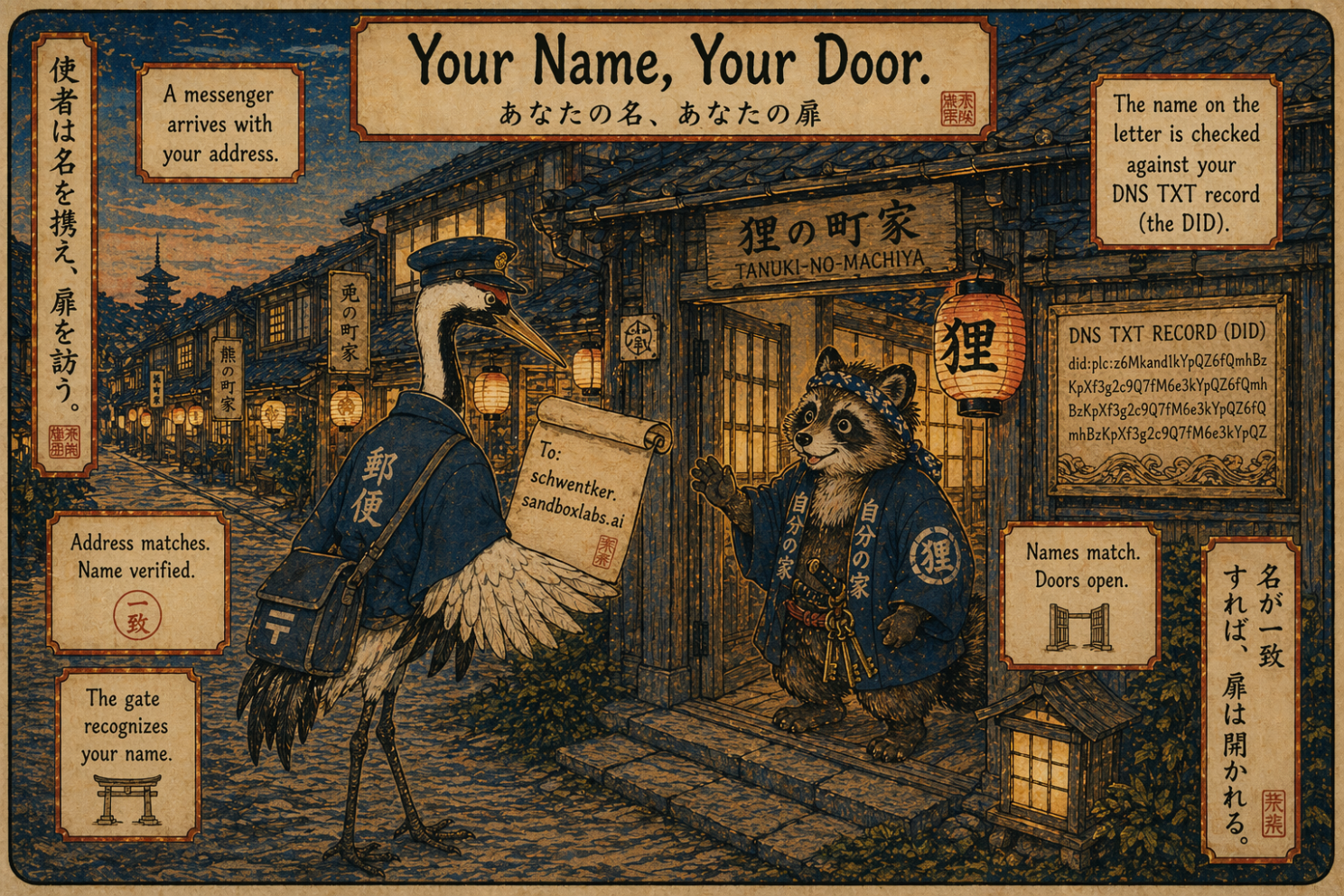
Scene 6: Your name, your door
One more piece. How does the network know that the handle “schwentker.sandboxlabs.ai” belongs to the PDS at pds.sandboxlabs.ai?
Through DNS. Specifically, one magic text record.
DNS (Domain Name System) is the internet’s phonebook. When someone types a domain, DNS translates it to an IP address. But DNS can also carry little notes called TXT records: small bits of text attached to a domain for purposes other than routing.
To claim a handle on ATProto, you add a TXT record at _atproto.yourhandle.com containing your DID. Anyone resolving your handle checks that record, finds your DID, looks up the DID to find your PDS, and fetches your data from there.
Three hops. Handle → DID → PDS → data. Every one cryptographically verifiable.
In the illustration, a messenger crane shows up at the gate with a scroll addressed to you. The crane checks the scroll against a carved wooden nameplate on the wall (the DNS TXT record). The name matches. The gate opens.
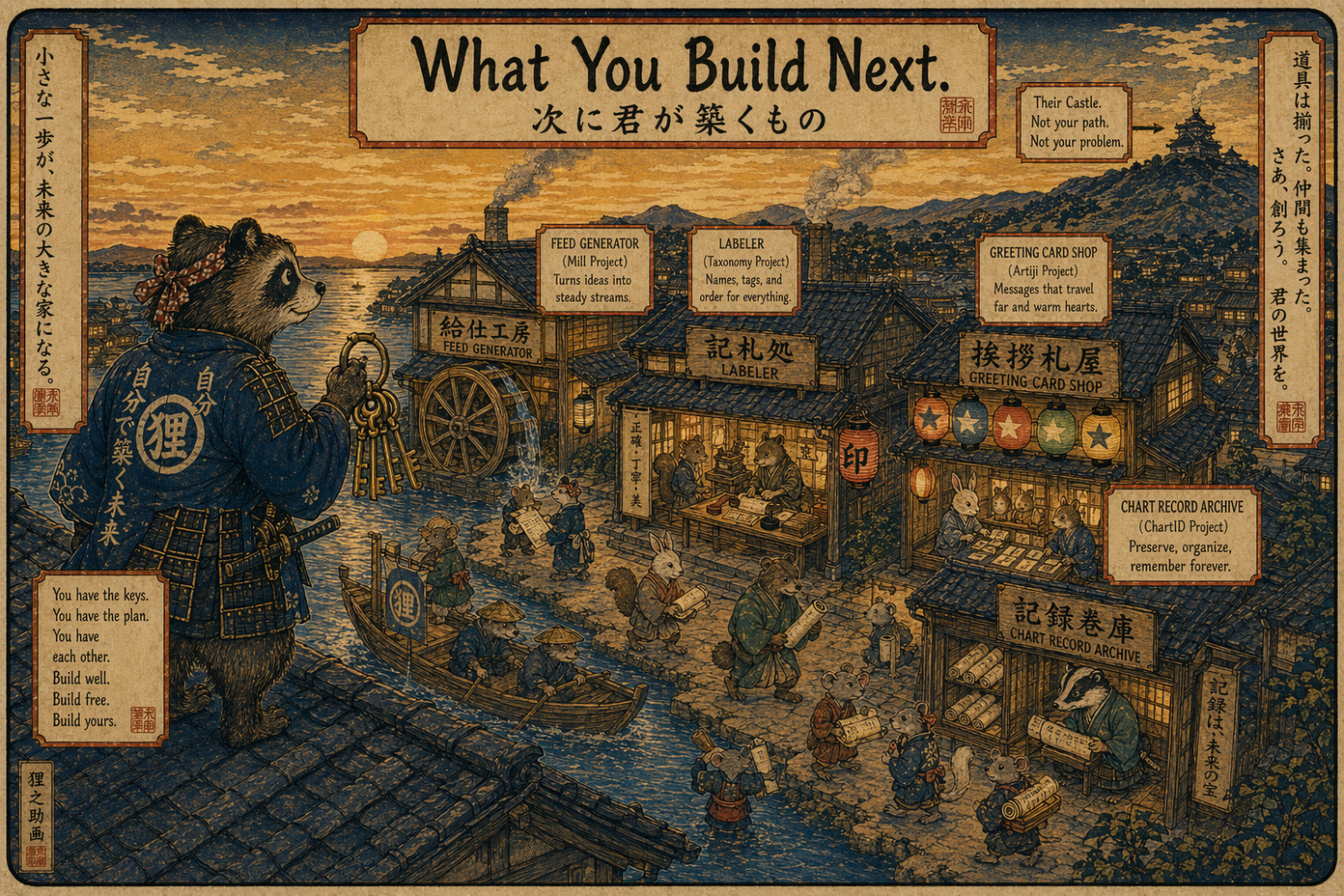
Scene 7: What you build next
Once your PDS is running, it becomes a platform for everything else you want to build in this ecosystem.
A custom feed generator with your own algorithm and your own taste. A labeler that tags posts with metadata no one else provides. A new kind of record, stored under a lexicon (ATProto’s word for a schema) you define yourself. An app that writes to your repository on your behalf.
My own roadmap includes:
-
Celestial Signals, a labeler that flags astrology content
-
ChartID, an open lexicon for astrological birth charts as first-class ATProto records
-
Artiji, a hyperpersonalized greeting card platform that writes chart records to the repository
Each is its own little building in the neighborhood that’s grown up around the main machiya. All of them sign records with keys rooted in the PDS. All of them depend on the foundation being stable.
The daimyo’s castle is still on the distant hill. It’s just not the only building in the valley anymore.
The actual setup
Now we shift from metaphor to terminal.
Here’s the compressed version. Each step has links and commentary. I’ll publish the full line-by-line walkthrough as a follow-up post.
What you need before starting:
-
A domain name you own (I use sandboxlabs.ai)
-
A Google Cloud account, free tier (no charges if you stay within limits)
-
A Cloudflare account, free tier, with your domain moved to Cloudflare’s nameservers
-
A terminal. If you’ve never opened one, that’s fine. You will now.
Step 1: Spin up a tiny server on Google Cloud. An e2-micro instance in us-central1. Google’s always-free tier gives you one of these for zero dollars per month, indefinitely. 1 GB of RAM, 30 GB disk. Add 2 GB of swap as a safety valve — the PDS runs on Node.js, which can choke a 1 GB machine during startup or heavy syncs. Cheap insurance, takes one minute, prevents a class of mysterious crashes you don’t want to debug at 11pm.
Step 2: Install Docker and Docker Compose. Your package manager handles this. Two commands. Docker Compose is how you describe “this container, with these settings, talking to that container” in a single YAML file.
Step 3: Pull the PDS image. The Bluesky team maintains an official container at ghcr.io/bluesky-social/pds. You pull it. You write a small docker-compose.yml and a .env file with your three secrets.
Step 4: Install cloudflared and create a tunnel. This is where you build your torii gate. cloudflared is Cloudflare’s tunnel client. Install it, authenticate, create a tunnel named pds, point it at your PDS container on port 3000, add a DNS record in Cloudflare routing pds.sandboxlabs.ai through the tunnel.
Step 5: Disable Let’s Encrypt in the PDS config. Cloudflare terminates TLS at its edge, so the PDS doesn’t need to manage certificates. Set the relevant env var (it varies by version, check the example in the repo).
Step 6: Create an account. Hit your PDS’s admin endpoint with the ADMIN_PASSWORD to generate an invite code, then use the Bluesky app to create a new account pointing at your PDS.
Step 7: Add your handle. DNS TXT record at _atproto.yourhandle.com containing did=did:plc:xxxxxx.
Step 8: Celebrate. You now own your little machiya.
Full setup took me about 8 hours across two sessions, with two LLMs helping: Claude for architecture decisions, Gemini for step-by-step command sequences. A coder who’s done this before could probably do it in an hour. A citizen builder with AI help can absolutely do it in a weekend.
Glossary
ATProto (AT Protocol). The open protocol underneath Bluesky. Defines how identity, data, and social interactions work in a federated way. Spec is public. Anyone can build on it.
AppView. A service that consumes the global firehose of ATProto events and presents them to users in a particular way. Bluesky the app is an AppView. So is TokiMeki, Graysky, deck.blue, and many others.
Caddy. A web server with automatic HTTPS built in. The original PDS setup guide uses Caddy. We skip it because Cloudflare Tunnel terminates TLS for us. Still worth knowing about. Caddy is lovely.
Cloudflare Tunnel. An outbound-only connection from your server to Cloudflare’s network. Makes your server reachable publicly without opening any inbound ports.
Container. An isolated bubble for running software. See Docker.
DID (Decentralized Identifier). A permanent, cryptographically verifiable name for an ATProto account. Looks like did:plc:abc123… or did:web:yourdomain.com. What your handle resolves to under the hood.
DID:web. A flavor of DID anchored to a web domain you control. Easier to set up than did:plc but requires you to keep your domain.
DNS (Domain Name System). The phonebook of the internet. Translates domain names to IP addresses. Also carries TXT records used for handle verification in ATProto.
Docker. Software that runs programs inside containers. The PDS runs as a Docker container.
Docker Compose. A way to define multi-container setups in a single YAML file. One file, one command (docker compose up), everything starts.
Firehose. The continuous stream of all events happening across every PDS in the network, broadcast by the relay. Useful if you’re building an AppView, labeler, or feed generator.
GCP (Google Cloud Platform). Google’s cloud provider. Has a generous free tier that covers a small PDS indefinitely.
Handle. Your human-readable name on Bluesky. Can be a Bluesky subdomain (yourname.bsky.social) or your own domain (yourname.com).
JWT (JSON Web Token). A signed token used to prove you’re logged in. The JWT_SECRET signs these tokens for your PDS.
Labeler. A service that tags ATProto content with metadata. “This post is about astrology.” “This post contains spoilers.” Users subscribe to labelers they trust.
Let’s Encrypt. A free service that issues TLS certificates. Most self-hosted servers use it. We don’t because Cloudflare handles TLS.
Lexicon. ATProto’s word for a schema. Defines what a particular kind of record looks like: its fields, types, constraints. app.bsky.feed.post is the lexicon for a Bluesky post. You can define your own.
PDS (Personal Data Server). The thing this whole article is about. The software that holds your ATProto repository and serves it to the network.
PLC (Public Ledger of Credentials). A directory of DIDs that can move between hosts. When your handle resolves to did:plc:something, that DID is registered with PLC. Bluesky currently operates the main PLC directory. It’s open-source and could be replicated.
PLC_ROTATION_KEY. The key that proves you have the right to update your DID’s PLC record. Guard it like a crown jewel.
Relay. A service that reads from every PDS it knows about and broadcasts the combined stream to AppViews. Currently Bluesky runs the main one. Anyone can run another.
Repository. Your collection of ATProto records. Posts, follows, likes, profile, anything else you’ve created. Signed by your keys. Stored in your PDS.
SQLite. A small, reliable, file-based database. The PDS uses it for local state.
TLS (Transport Layer Security). What makes HTTPS secure. Encrypts traffic between clients and servers. Cloudflare handles TLS for us.
TXT record. A DNS record containing arbitrary text. Used in ATProto to bind a handle to a DID.
Vibe coding. Building software with heavy AI assistance, without a formal CS background. A good term. The citizen builder’s default mode now.
Final note
If this helped you get your own PDS running, post about it. Tag it #atproto. DM me your handle. I’m collecting citizen builders in the Bay Area and we’re starting to meet up in person. Your machiya is welcome in the neighborhood.
📍 Oakland
bsky.app/profile/schwentker.sandboxlabs.ai/post/3mkgmrsjccc2e